Salesforce Backup & Restore
Salesforce Data Backup That Lives in Your Own AWS
Real-time or scheduled Salesforce data backup and restore, versioned down to every change — stored in your cloud, not ours.
- HIPAA, GDPR, SOX ready
- Your keys, your S3
- Live in hours
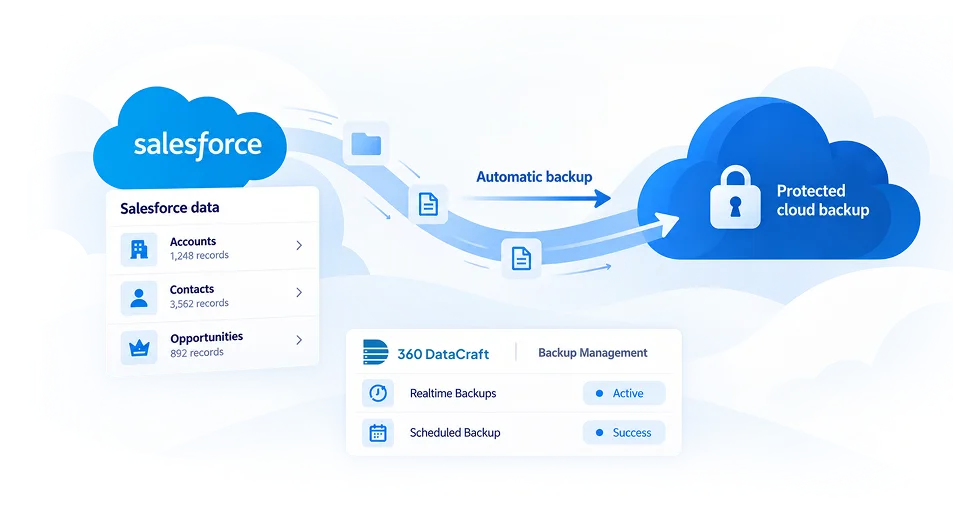
Salesforce data
- Accounts1,284 records
- Contacts8,931 records
- Opportunities3,402 records
360 DataCraft · Backup Management
- Realtime Backup● Active
- Scheduled Backup● Daily 02:00
- 5 edits = 5 versionsevery change kept
- ~95% smallercompressed storage
- Your keys, your S3full ownership
- ~95%Storage reduction from compression
- HoursTime to go live
- UnlimitedBackup retention
- 100%Records versioned on every change
Salesforce Backup Methods That Fit Every Object
One platform handles both real-time and scheduled backup — without manual setup per record type.
-
Real-Time
Apex triggers push every create, update and delete to a AWS S3 bucket you own as it happens.
-
Scheduled
Run full or incremental delta backups on the cadence you choose — hourly, daily or weekly — per object.
-
Mixed Policies
Combine real-time for critical objects with scheduled backup for high-volume, low-change data.
DML event → Apex trigger → your S3
- create
- update
- delete
- undelete
- async, bulk-safe
What You Configure in Our
Salesforce Data Backup Policy
Named, flexible, and built per org — not a one-size-fits-all toggle.
- 01
Source Environment
Production, sandbox, and multiple Salesforce environments, all managed from one portal.
- 02
Data Scope
Pick the objects, fields and record filters each policy should cover.
- 03
Object Hierarchy
Parent and child objects are backed up together with relationships preserved.
- 04
Backup Mode
Real-time, scheduled, or a mix — chosen per object.
- Account
- Contact
- Opportunity
- Case
Salesforce Backup Features
That Go Beyond a Basic Snapshot
Every version kept. Every record recoverable. No exceptions.
Change Versioning
Every change is a new version, never an overwrite. Five edits means five recoverable states.
Deleted Record Retention
Deletions are versioned too. Records stay recoverable in your S3 even after the recycle bin empties.
Auto Child Relationship Mapping
Select a parent object and all child objects are mapped automatically.
Incremental Delta Sync
Scheduled runs capture only what changed since the last backup — keeping API consumption and runtime low.
Multi-Environment Support
One 360 DataCraft org can cover production, sandbox and multiple Salesforce environments.
Run History and Audit Logs
Every backup run logs start time, end time, records processed and errors.
Data Compression
Backup data is compressed to ~2–5% of its Salesforce footprint. A 10 GB org typically lands under 200 MB in your S3.
Files and Attachments
Salesforce Files, ContentVersion records and attachments are transferred into your S3 at a fraction of native storage cost.
Salesforce Data Backup and Restore
— Built for Fast, Targeted Recovery
Backup and restore are configured and aligned together. Once your backup policy runs, recovery is immediate.
1. Granular Restore Filters
Filter by date, time, object, record ID, owner, deleted records, or custom SOQL — restore exactly what changed, nothing more.
2. Dry Run Preview
See exactly which records will be affected before anything touches your live org.
3. Conflict Resolution
Choose how restored data lands — override, skip if exists, append as new, or merge.
Try it: how should restored records land?
Ap-in 3,000 Record Chat SuiteOverride — restored values replace whatever is in the live record now. Best for undoing a bad batch job or an accidental update.
| Object | Found | Will change |
|---|---|---|
| Account | 312 | 312 |
| Contact | 1,204 | 1,204 |
| Opportunity | 480 | 480 |
Salesforce Data Backup Storage
— Compressed & Secure
Your keys, your AWS, your compliance — HIPAA, GDPR, and SOX ready because we never touch your data.
~95% Storage Reduction
10 GB of Salesforce data compresses to under 200 MB in your S3.
Your AWS, Your Keys
360 DataCraft never stores, reads, or accesses it.
Tiered Storage Ready
Backups can move through S3 storage classes to Glacier for lower cost.
Retention — Unlimited
Keep as many versions as you need, set by your own policy.
- HIPAA
- GDPR
- SOX
- Data never leaves your AWS
The Backup Setup That takes Hours, Not a Quarter.
No implementation consultants. No lengthy configuration. Real-time or scheduled backup, live in hours.
Questions admins ask before they switch
Can't find your answer? Talk to a Salesforce backup specialist.
sales@360datacraft.com
What is a backup policy in 360 DataCraft?
A named configuration that defines what gets backed up, how, and when — source environment, destination bucket, object scope, and backup mode. You can run multiple policies concurrently, each scheduled or real-time on everything else.
Is 360 DataCraft compliant with HIPAA, GDPR, and SOX?
Data is stored in your own AWS account with your encryption keys, so you keep full control and can align with HIPAA, GDPR and SOX requirements.
Does real-time Salesforce backup affect org performance?
Backups run asynchronously through bulk-safe Apex, so user transactions are not slowed.
What happens if I select a parent object for backup?
Child objects are discovered and mapped automatically so relationships are preserved.
How does Salesforce scheduled backup handle high-change-volume objects?
Incremental delta sync captures only changed records since the last run, keeping runtime and API usage low.
Can backup data be exported without restoring into Salesforce?
Yes. Data sits in your S3 in open formats, so you can export or query it directly.
Does 360 DataCraft back up Salesforce files and attachments?
Yes — Files, ContentVersion records and attachments are transferred to your S3.